
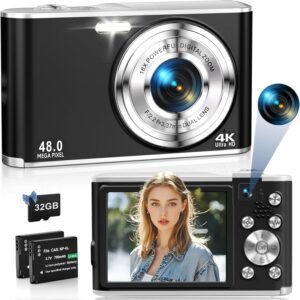
Interested in a compact camera that promises 4K video, 48MP photos, and dual front/rear cameras without weighing you down?

Quick overview of the 4K Digital Camera 48MP Autofocus Cameras for Photography Compact Camera with Dual Front and Rear Camera, Point and Shoot Cameras with16X Digital Zoom, 32GB TF Card & 2 Batteries-Black
You’ll find this compact travel camera aimed at beginners and casual users who want better image and video quality than a basic phone can provide. It combines a high-resolution imaging claim (48MP), a 4K-capable video mode, autofocus, dual front/rear cameras for selfies and regular shots, a 2.8″ IPS screen, and two batteries plus a 32GB card in the box so you can start shooting right away.

4K Digital Camera 48MP Autofocus Cameras for Photography Compact Camera with Dual Front and Rear Camera, Point and Shoot Cameras with16X Digital Zoom, 32GB TF Card & 2 Batteries-Black
Key specifications at a glance
The table below breaks down the main specs and what’s included so you can quickly understand the camera’s capabilities and the bundle you’re getting.
| Feature | Details |
|---|---|
| Image resolution | 48MP (claimed; upscaled/interpolated sensors are common in this category) |
| Video resolution | 4K (also supports FHD and other modes—see manual for frame rates) |
| Sensor type | Upgraded CMOS technology (manufacturer-stated) |
| Autofocus | Yes — half-press shutter to focus |
| Front/Rear cameras | Dual camera (front for selfies, rear for main shooting) |
| Screen | 2.8″ IPS LCD |
| Zoom | 16X digital zoom |
| Storage | Supports 4GB–256GB TF/SD cards; 32GB card included |
| Batteries | Two 700mAh batteries included |
| Additional features | Built-in microphone and speaker, anti-shake, self-timer, continuous shooting, flashlight |
| Connectivity | USB connection for file transfer and webcam use |
| Weight/Size | Compact, pocketable (smaller and lighter than many smartphones) |
| Included in box | Camera, 2 batteries, 32GB TF card, charger/cables (check product listing for exact accessories) |
| Support | 24-hour after-sales service (manufacturer-provided) |
Design and build
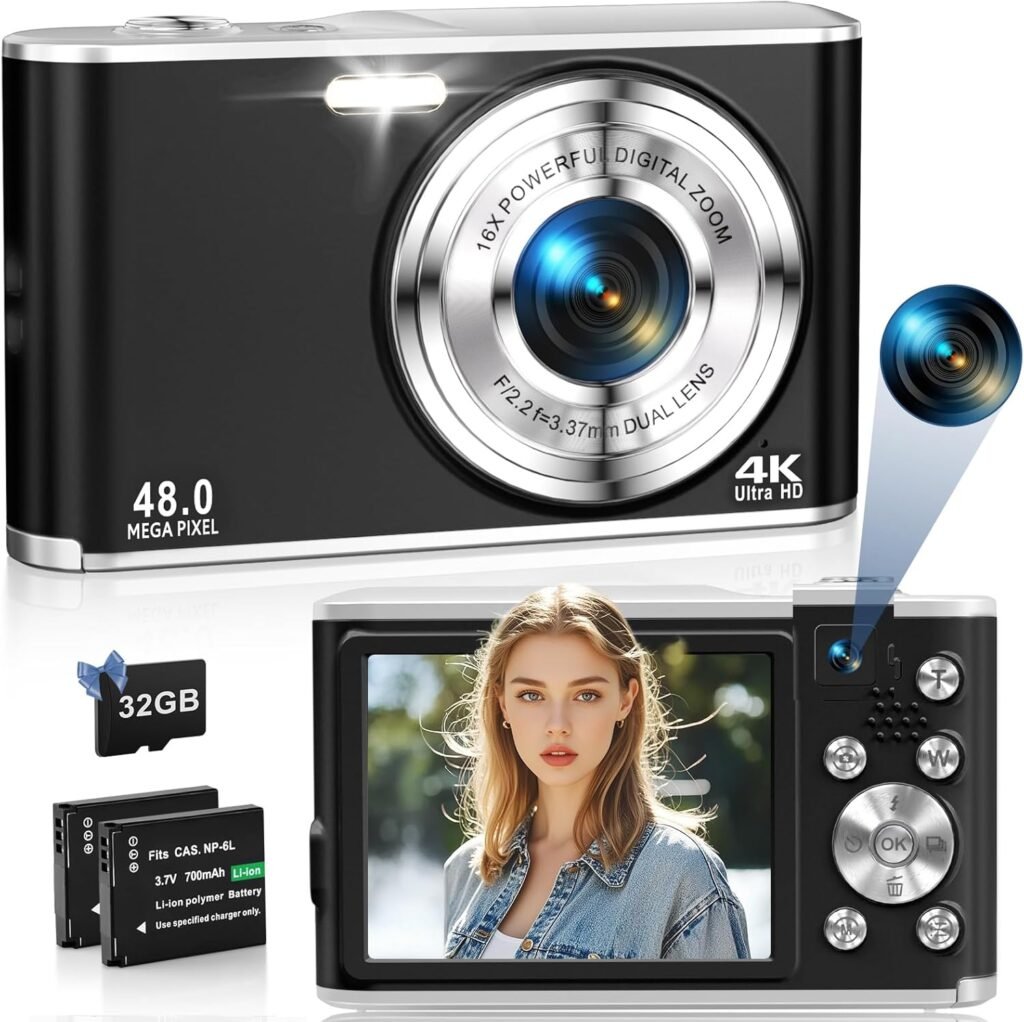
The camera is built to be simple and portable, with a compact body that you can slip into a pocket or hang on your wrist. Controls are straightforward: a shutter button, zoom W/T button, navigation and menu buttons — enough to get comfortable quickly without a steep learning curve. The plastics used are typical for budget travel cameras; they keep weight down but feel less premium than metal-bodied models.
This image is property of Amazon.com.
Portability and everyday carry
You’ll appreciate how light and small this camera is compared with bulkier mirrorless or DSLR kits. The 2.8″ IPS screen gives you decent framing and playback without making the unit large. Because it includes two batteries, you can swap one in and keep shooting without hunting for an outlet. If you travel light or want a camera dedicated to quick snapshots and vlogs, this one’s designed to make carrying and using it easy.
Image quality — what to expect from 48MP
The camera claims a 48MP image resolution, which sounds impressive on paper. In practice, cameras in this price and size range often use sensor interpolation or aggressive in-camera processing to reach that number. You’ll get sharp, colorful photos in good light where the sensor works best. However, expect noise and detail loss in low light compared with larger-sensor cameras or higher-end compact models. For social media, family photos, travel snaps, and quick prints, the photos should satisfy you. For large prints, detailed landscape work, or professional usage, you’ll notice limitations.
Video performance and sound
This model advertises 4K video recording and includes a built-in microphone and speaker so you can capture sound with your footage. While 4K capability is a major plus, you should check the actual frame rate options (30fps is common at budget price points; higher frame rates might not be available). The built-in mic will capture ambient sound well enough for vlogs and casual videos, but if you want cleaner voice audio, use an external microphone or a separate audio recorder. The anti-shake feature helps reduce some motion blur, but it’s not a substitute for optical stabilization found on higher-end cameras.
This image is property of Amazon.com.
Autofocus system and dual camera usage
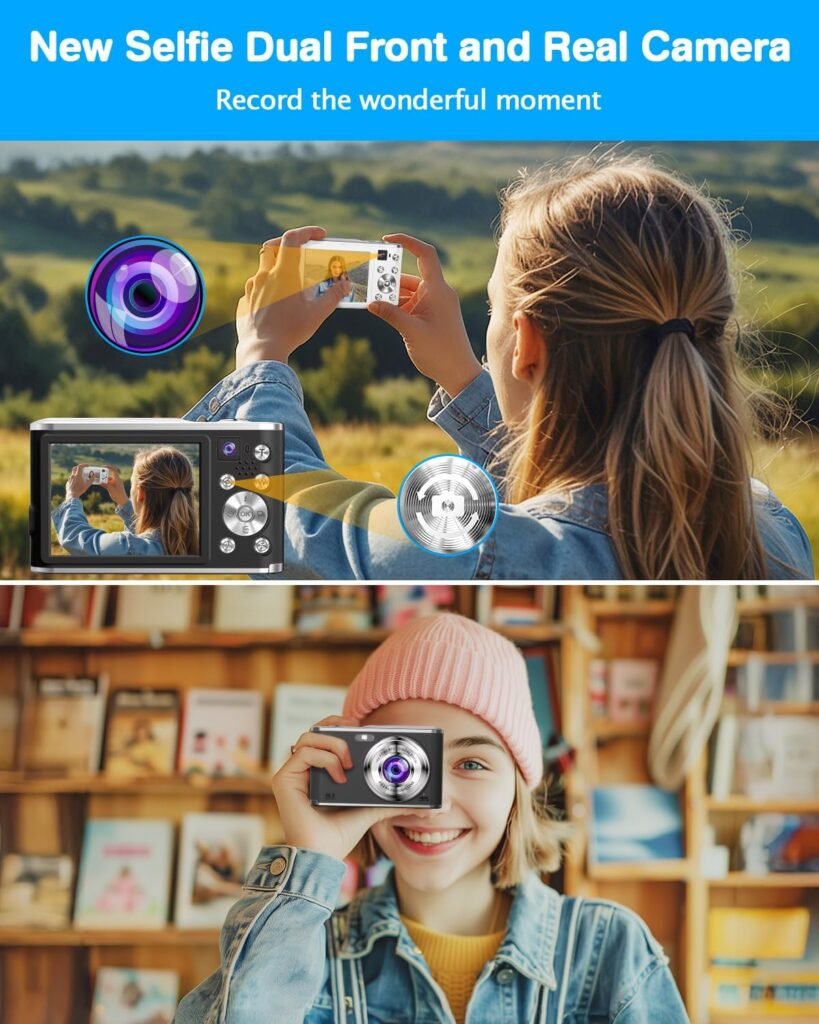
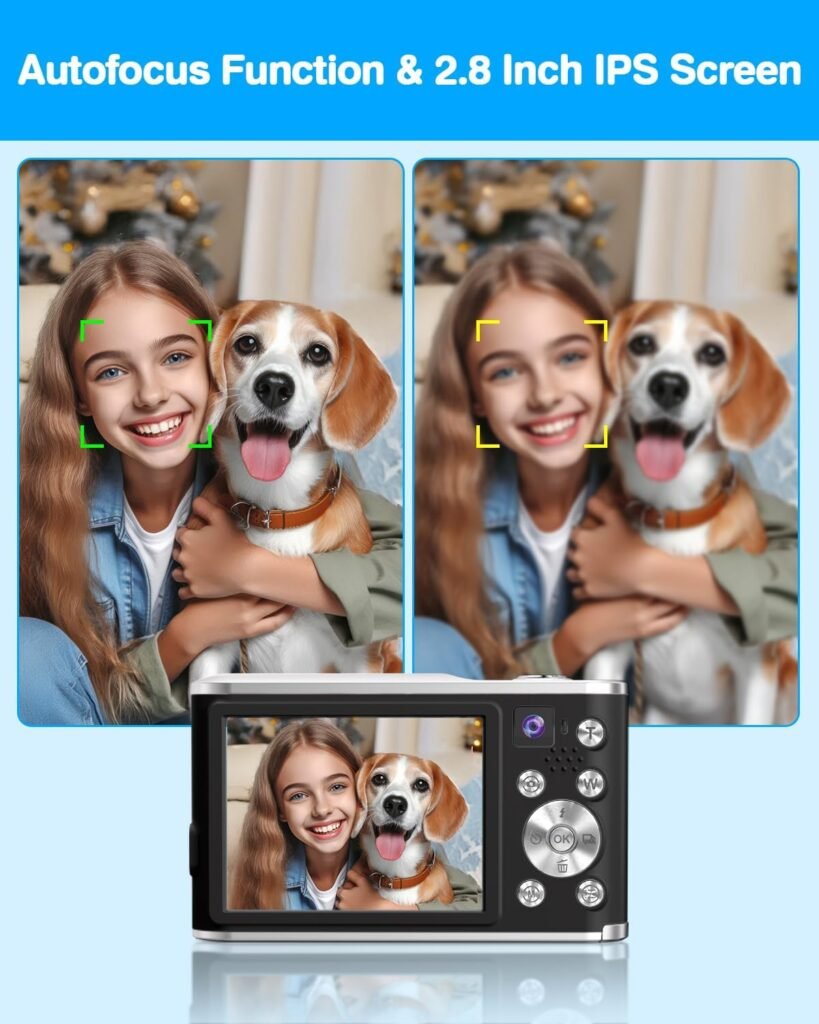
You focus by half-pressing the shutter button, which locks focus for crisp images when it works. The camera uses upgraded CMOS technology and a basic autofocus routine that’s suitable for still subjects and moderate action. Rapid moving subjects or very low light may challenge the autofocus. The dual-camera design gives you a one-click switch to the front camera for selfies and the rear camera for typical shooting. This makes it easy to create vlogs, record first-person commentary, or take group shots without rearranging gear.
Screen, menu, and user interface
The 2.8″ IPS screen offers decent brightness and viewing angles for composing shots and reviewing footage. The menus are typically simple and focused on essential settings — image size, video mode, timers, flash, and so on. Controls are intuitive enough that you can teach a family member or a teenager to use the camera quickly. If you like manual control depth, this model is more about point-and-shoot convenience than granular settings.
Zoom, shooting modes, and features
You get a 16X digital zoom that helps you frame distant subjects, but digital zoom essentially crops and enlarges the image, so image quality will degrade at longer zoom levels. Useful built-in modes include a self-timer (3s/5s/10s), 3-shot continuous shooting, flash, anti-shake, and auto scene adjustments. These features help you handle different situations without needing extra lenses or accessories. For more creative control, you can still adjust basic picture resolution and use the self-timer or continuous modes to capture action or group photos.
This image is property of Amazon.com.
Storage options and included 32GB TF card
The camera supports TF/SD cards from 4GB up to 256GB. A 32GB card is included, which is enough for many photo sessions and a fair amount of video footage (depending on your chosen video resolution and bitrate). If you plan to shoot lots of 4K video, consider upgrading to a larger, faster card (e.g., 64GB/128GB with a UHS speed rating) so you don’t run into recording interruptions or capacity issues while traveling.
Battery life and practical usage with two batteries
Two 700mAh batteries are included, letting you swap and continue shooting when one battery runs out. Battery life will vary depending on how heavily you use features like video, image review, flash, and screen brightness. Shooting lots of 4K video consumes battery faster than still photography. Carrying both batteries fully charged gives you more flexibility in the field, and the included spare means you can avoid carrying a bulky external charger or portable power bank if you’re out for a short trip.
Webcam capability and connectivity
You can connect the camera to your PC and use it as a webcam for video calls and live streaming. Setup is usually straightforward: plug in via USB and select the camera as your video device in conferencing or streaming software. Keep in mind that the webcam function may require specific drivers or selectable modes in the camera menu. Check the manual for details on how to enable webcam mode and any software requirements.
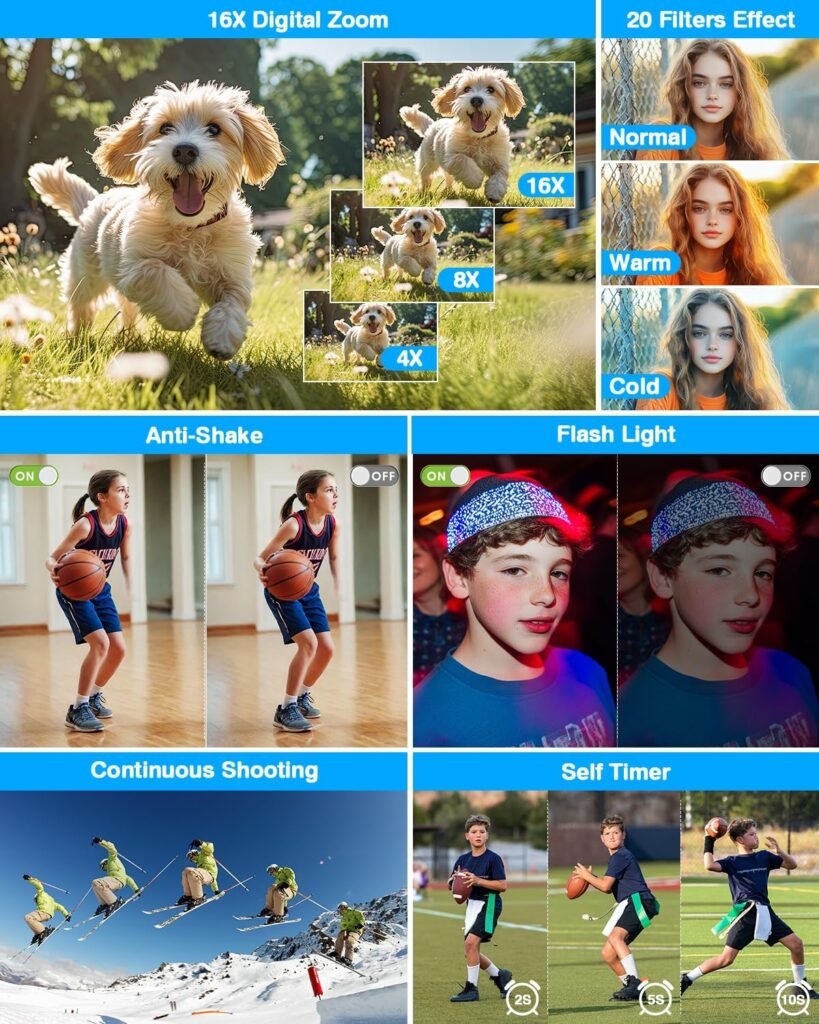
This image is property of Amazon.com.
Who this camera is for
You’re likely to enjoy this camera if you’re a beginner, a casual shooter, a traveler wanting something pocketable, or someone buying a camera for a child or a teen. It’s well-suited for vlogging, social media content, vacation photos, and everyday documentation of life. If you’re a photography enthusiast seeking professional-level control, interchangeable lenses, or superior low-light performance, you’ll outgrow this camera relatively quickly.
Real-world shooting scenarios and performance
- Daytime travel photos: You’ll capture bright, colorful images with good detail for online sharing.
- Indoor family events: The camera can handle well-lit indoor environments, especially with flash, but take care in dim lighting as noise will increase.
- Vlogs and selfies: The front camera and internal mic make casual vlogging effortless; pair with an external mic if you need better voice clarity.
- Action shots: Continuous shooting and autofocus handle moderate action, but very fast movement may result in soft or missed frames.
- Low-light or night scenes: Expect limitations — use flash when practical and keep ISO low to reduce noise. Consider adding a small tripod or using brighter ambient lighting.
Practical tips to get the most from this camera
- Use daylight when possible: The sensor performs best in good light, producing cleaner, sharper images.
- Avoid heavy reliance on full digital zoom: If you need closer framing, move physically closer or crop in post — heavy digital zoom reduces detail.
- Carry and rotate batteries: Keep both batteries charged and rotate them during long outings to avoid downtime.
- Use anti-shake and tripod: For video or long exposures, use anti-shake if available and a compact tripod for steadier results.
- Choose the right card: If you plan to shoot a lot of 4K video, use a high-capacity, high-speed TF/SD card to prevent write issues.
- Clean lens and sensors gently: Use a soft microfiber cloth for lens cleaning to keep images sharp.
- Test webcam mode before live streaming: Confirm compatibility and settings with your streaming software beforehand.
Accessories worth considering
- A higher-capacity TF/SD card (64GB or 128GB) with a fast write speed for extended 4K recording.
- A lightweight tripod or mini tripod for stable video and low-light stills.
- A compact external microphone for clearer voice capture during vlogs.
- A protective case or small camera bag to prevent scratches and protect the camera while traveling.
- Additional spare batteries if you’ll be away from power for extended periods.
Pros and cons
You should weigh these pros and cons in the context of how you plan to use the camera.
Pros:
- Compact, lightweight, and easy to carry.
- Claims 48MP photos and 4K video, which are attractive specs for casual users.
- Dual front and rear cameras make selfies and vlogs easy.
- Includes two batteries and a 32GB card out of the box.
- 2.8″ IPS screen provides good viewing angles for framing and playback.
- Simple user interface good for beginners and children.
- Webcam capability for video calls and streaming.
- Built-in microphone and speaker for recording sound.
Cons:
- 48MP claim may include interpolation; image quality won’t match larger-sensor cameras.
- Digital 16X zoom reduces image quality at high zoom levels.
- Limited low-light performance and potential autofocus struggles in challenging conditions.
- Build materials are likely plastic and not as durable as higher-end models.
- Frame rate details for 4K aren’t always specified — may be limited to 30fps.
- Built-in mic ok for casual use but not for professional audio without an external mic.
Comparison with similar alternatives
Here’s a quick comparison to help you see where this camera sits relative to other entry-level compact options.
| Category | This Camera | Typical higher-end compact | Smartphone flagship |
|---|---|---|---|
| Portability | Excellent (very compact) | Good to moderate | Excellent (always with you) |
| Image sensor size | Small (interpolated 48MP) | Larger fixed sensors | Variable; often small but with heavy computational processing |
| Video | 4K capability (likely 30fps) | 4K 30–60fps, better stabilization | 4K 30–60fps with strong computational stabilization |
| Autofocus | Basic AF, half-press focus | Fast hybrid AF | Fast PDAF and computational AF |
| Zoom | 16X digital | Optical zoom or hybrid | Digital/optical hybrid, per model |
| Price | Budget-friendly | Mid-to-high range | Varies; can be mid-to-high range |
| Use case | Beginners, travel, vlogging | Enthusiast photography/vlogging | Everyday use, powerful processing |
If you want something with better low-light performance or optical zoom, consider mid-range compact cameras from mainstream brands. If convenience and social media-ready photos are your priority, this camera covers those needs affordably.
Troubleshooting common issues and quick fixes
- Camera won’t power on: Make sure battery is charged and inserted correctly. Try the spare battery. Confirm power switch is fully engaged.
- Memory card not recognized: Format the card in-camera (after backing up data), or try a different card. Use recommended TF/SD card class ratings for best compatibility.
- Video stops recording mid-way: Check card capacity and speed. For 4K, use a high-speed card and avoid exceeding the maximum supported capacity.
- Blurry images: Ensure autofocus is locking (half-press shutter) before taking the shot, clean the lens, or increase shutter speed to reduce motion blur.
- Poor audio quality: Move closer to the subject, reduce background noise, or use an external microphone if possible.
- Webcam mode not working: Install any required drivers, select the camera in your video app, and test in multiple apps to isolate the issue.
After-sales and warranty considerations
The product provides 24-hour after-sales service according to the product details. If you encounter problems, document the issue with photos or video and contact the seller or manufacturer promptly. Keep your purchase receipt and the included serial number or packaging details handy in case you need warranty support. If you buy from a marketplace, check return windows and seller ratings before purchase.
Practical scenarios where this camera shines
- Family gatherings: Quick, simple operation for group photos and candid moments.
- Travel snapshots: Lightweight design makes it easy to bring on day trips and sightseeing walks.
- Beginner vlogging: Front camera plus microphone and built-in speaker make it easy to record vlogs without complex setups.
- Kids and teenagers learning photography: Simple interface and included accessories mean they can practice without extra cost.
- Remote meetings on PC: Use as a step-up webcam with a wider field of view than many laptop cameras.
Limitations to be aware of
You shouldn’t expect professional performance in low light or fast action. The digital zoom and noise at high ISO will limit image quality for demanding projects. If you need interchangeable lenses, precise manual controls, or the best dynamic range, you’ll be better served by more advanced systems. Also verify the actual supported video frame rates for 4K recording in the manual — not all budget cameras provide 4K at high frame rates.
Sample settings and practical advice for different situations
- Bright daylight photos: Use the highest image resolution, keep ISO low (auto ISO with low limit), and avoid heavy digital zoom.
- Indoor family photos: Use flash if ambient light is low, select a lower shutter speed only if you have steady hands or a tripod.
- Vlogging outdoors: Use the front camera, set exposure compensation as needed to avoid blown highlights, and keep the camera stable or use a small gimbal/tripod.
- Streaming as webcam: Connect via USB, select the camera as your video input, and test audio levels before starting a call.
Final recommendation
If you’re looking for an affordable, travel-friendly point-and-shoot that gives you more than your average compact phone camera and helps you create quick vlogs and social content, this 4K Digital Camera 48MP Autofocus Cameras for Photography Compact Camera with Dual Front and Rear Camera, Point and Shoot Cameras with16X Digital Zoom, 32GB TF Card & 2 Batteries-Black is a solid choice. It offers an attractive bundle with two batteries and a 32GB card, easy-to-use dual-camera functionality, and features geared toward beginners. If your priorities are professional-level image quality, advanced low-light capability, or optical zoom, you’ll want to consider higher-tier compact cameras or interchangeable-lens systems instead.
If you want, I can help you compare this model with specific alternatives in your budget range or suggest the right TF/SD card and accessory list based on the type of photography or video you plan to do.

Disclosure: As an Amazon Associate, I earn from qualifying purchases.